Appearance
QMessageBox
- 消息对话框
- 使用构造函数方法
- QMessageBox::StandardButton 是对话框选项按钮,是一个枚举
CPP
QMessageBox(QMessageBox::Icon icon,
            const QString &title,
            const QString &text,
            QMessageBox::StandardButtons buttons = NoButton,
            QWidget *parent = nullptr,
            Qt::WindowFlags f = Qt::Dialog |
Qt::MSWindowsFixedSizeDialogHint)- 静态方法使用方法
- 常用静态方法有
information,warning,critical,question,都差不多,只是第三个参数默认值不同(question 是 Yes 和 No), 另外还有两个无返回值的about和aboutQt
cpp
information(QWidget *parent,
            const QString &title,
            const QString &text,
            QMessageBox::StandardButtons buttons = Ok,
            QMessageBox::StandardButton defaultButton = NoButton)
用法示例:
CPP
void Widget::on_questBtn_clicked() {
  QMessageBox box(QMessageBox::Icon::Question,
                  "问题", "今晚一起吃个饭好吗?",
                  QMessageBox::Ok | QMessageBox::No, this);
  int button = box.exec();

  if (button == QMessageBox::Ok) {
    QMessageBox::information(this, "结果", "好的,今晚见!");
  } else if (button == QMessageBox::No) {
    QMessageBox::information(this, "结果", "好吧,再见!");
  }
}
QFontDialog
- 字体选择对话框
- 常用静态方法 QFontDialog::getFont
CPP
bool ok;
QFont font = QFontDialog::getFont(&ok,
                                  QFont("幼圆", 20, 10, false), this);
if (ok) {
  // ui->textEdit->setFont(font); // 对整个组件的文本设置字体
  ui->textEdit->setCurrentFont(font); // 对组件中当前选中的文字设置字体
} else {
  QMessageBox::information(this, "title", "没有选择字体");
}
QColorDialog
- 颜色选择对话框
- 常用静态方法 QColorDialog::getcolor
CPP
QColor color = QColorDialog::getColor(QColor("#66CCFF"), this,
                                        "选择颜色");
  if (color.isValid()) {
    // ui->textEdit->setTextColor(color);   // 设置前景色
    ui->textEdit->setTextBackgroundColor(color); // 设置背景色
  } else {
    QMessageBox::information(this, "title", "没有选择颜色");
  }
QFileDialog
- 文件选择对话框
- 常用静态方法
QFileDialog::getOpenFileName
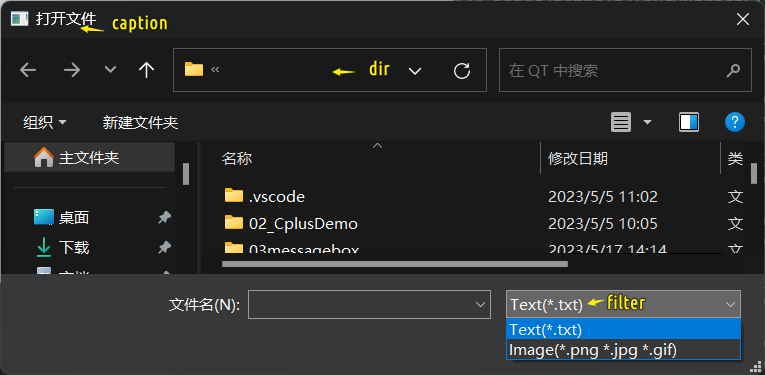
cpp
QFile file;
QString path = QFileDialog::getOpenFileName(
    this, "打开文件", "../", "Text(*.txt);;Image(*.png *.jpg *.gif)");
if (path.isEmpty() == false) {
  file.setFileName(path);
  bool isOk = file.open(QIODevice::ReadOnly);
  if (isOk == true) {
    QByteArray array = file.readAll();
    ui->textEdit->setText(array);
  }
  file.close();
}