Appearance
今天学习一下 vim surround 这个插件( VSCode VIM 自带)
使用方法
The three "core" operations of add/delete/change can be done with the keymaps ys{motion}{char}, ds{char}, and cs{target}{replacement}, respectively. For the following examples, * will denote the cursor position:
vim
Old text                    Command         New text
--------------------------------------------------------------------
surr*ound_words             ysiw)           (surround_words)
*make strings               ys$"            "make strings"
[delete ar*ound me!]        ds]             delete around me!
remove <b>HTML t*ags</b>    dst             remove HTML tags
'change quot*es'            cs'"            "change quotes"
<b>or tag* types</b>        csth1<CR>       <h1>or tag types</h1>
delete(functi*on calls)     dsf             function calls
更改 surround
例如把 "hello world" 的 “改成 ' ,输入cs"'(change surround " ')
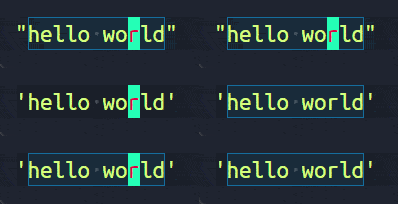
删除 "hello world" 周围的" 输入 ds"(delete surround ")
给hello 周围加上] 输入ysiw(y surround in word ])
给整行周围加上 ) 输入 yss)
html tags
支持 html tags,例如把 "hello world"用<div>标签包围,可以输入 cs"<div>
删除的时候使用dst,或者cst"改回来